Subtitle Downloader — Free .SRT Files, Instantly
Get a ready-to-use .SRT subtitle file from any YouTube, TikTok, Instagram, Facebook, or X video — or your own uploaded file. Free, unlimited, no sign-up.
Download Subtitles Now — Free →Get Accurately Timed Subtitles in Seconds
TranscriptAny generates a properly formatted .SRT subtitle file from any video's audio — timestamped, synced, and ready to drop straight into your video editor. No manual timing, no typing it out by hand.
1
Paste a URL or Upload a File
Any YouTube, TikTok, Instagram, Facebook, or X video link — or upload your own MP4, MP3, WAV, and more
2
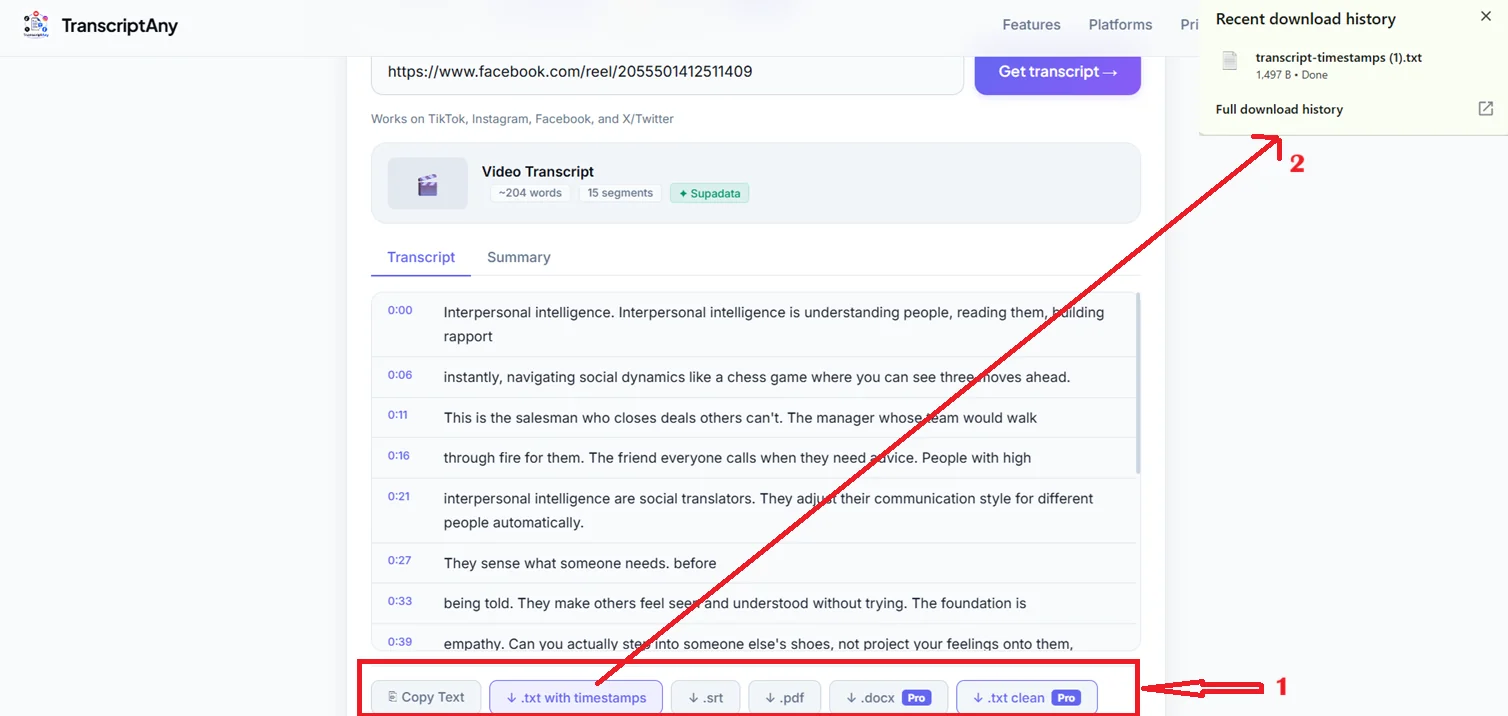
Get the Transcript
Your full transcript appears in seconds, broken into timestamped segments
3
Download the .SRT File
One click gets you a subtitle file ready to import into any video editor
Why Use TranscriptAny for Subtitles?
✓ Free, unlimited .SRT downloads
✓ No sign-up required
✓ Accurately timed to the original audio
✓ Works with any major video editor
✓ 50+ languages supported
✓ Works on YouTube, TikTok, Instagram, Facebook, X
✓ File uploads also supported
✓ No software to install
Frequently Asked Questions
What is an .SRT file?
An .SRT file is a standard subtitle format that pairs text with timestamps, so it stays in sync with a video. It's supported by nearly every video editor, media player, and platform that accepts custom captions.
Is the subtitle download free?
Yes. Downloading a .SRT subtitle file is completely free and unlimited on TranscriptAny, with no sign-up required, for any supported platform or uploaded file.
Which platforms and file types work?
YouTube, TikTok, Instagram, Facebook, and X/Twitter video URLs, plus uploaded MP4, MOV, MKV, WEBM, MP3, WAV, and M4A files up to 100MB.
Will the subtitles be accurately timed?
Yes. Each subtitle line is generated with real timestamps from the original audio, so the .SRT file drops directly into your video editor already synced — no manual timing needed.
🌐 TranscriptAny Also Works On
Ready to Download Subtitles?
Paste any video link or upload a file and get your .SRT subtitle file in seconds — free, unlimited, no sign-up.
Download Subtitles Now — Free →